
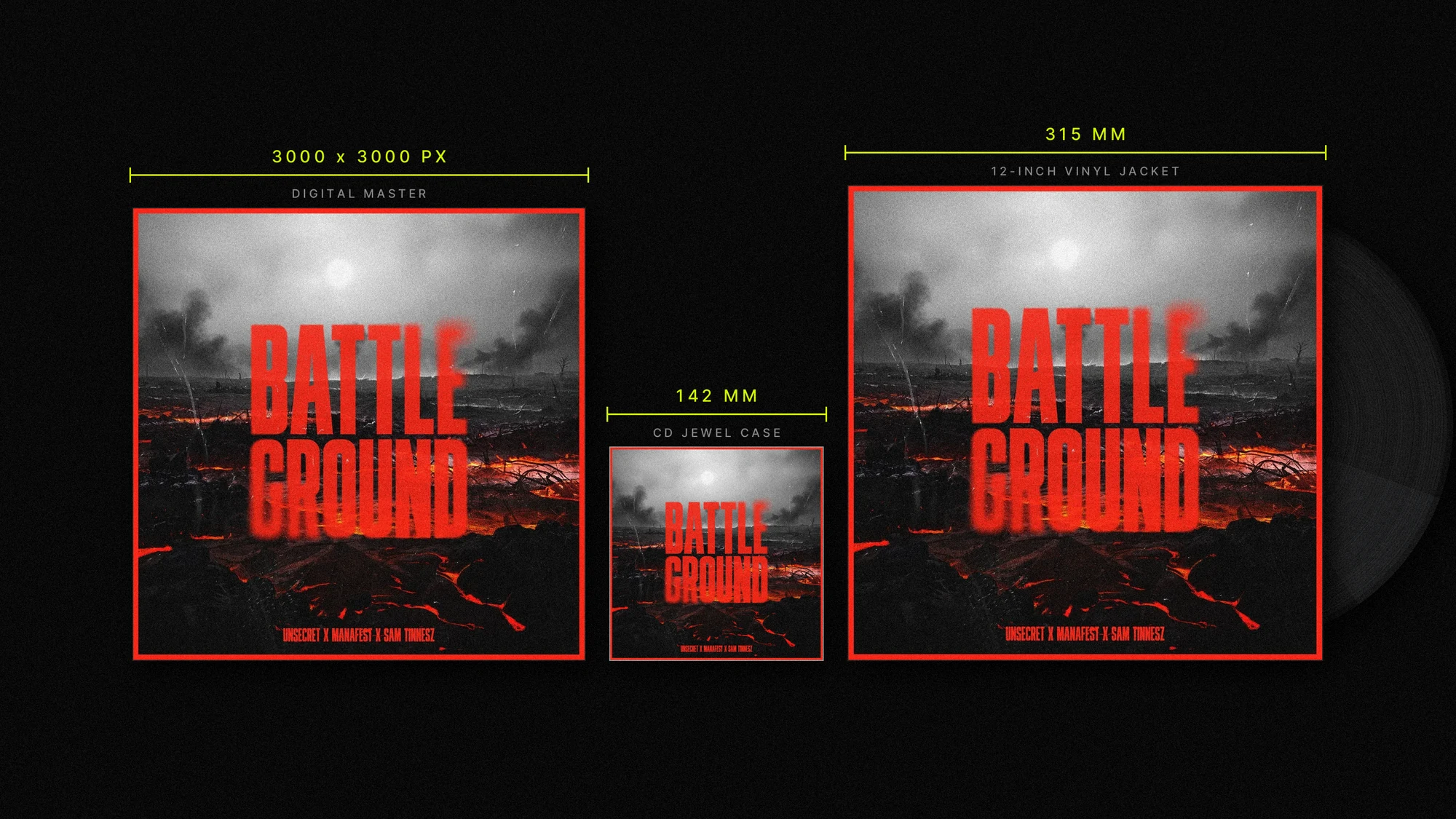
Quick answer: Use a 3000 × 3000 px square in sRGB for streaming. For Spotify Canvas, export a 1080 × 1920 px vertical MP4, 3–8 seconds long, with no audio. For print, prepare separate 300 dpi CMYK files with bleed, and use the printer’s template before finalizing dimensions.
| Format | Trim / canvas size | File setup |
|---|---|---|
| Streaming cover art | 3000 × 3000 px, 1:1 | sRGB; JPG or PNG |
| Apple Music cover art | 3000 × 3000 px preferred; 1400 × 1400 px minimum | Square; JPEG or PNG |
| Spotify Canvas | 1080 × 1920 px, 9:16 | MP4; 3–8 seconds; no audio |
| CD jewel case insert | 4.75 × 4.75 in trim | 300 dpi; CMYK; ⅛ in bleed per template |
| 12-inch vinyl jacket | 12.375 × 12.375 in trim | 300 dpi; CMYK; ⅛ in bleed per template |
These are working specs, not a substitute for a printer’s dieline or a distributor’s current upload requirements. In particular, CD package formats vary, and Apple’s requirements can differ by delivery route. Always check the exact template or portal you’re using.
Digital album cover dimensions: Spotify and streaming platforms
For a digital release, the most reliable master is a 3000 × 3000 px square. It gives you a high-resolution source that can be scaled down for streaming services, distributor portals, and promotional uses without starting from a small image. Keep the artwork in sRGB, the standard color space for screens.
Spotify currently accepts square cover art between 640 and 10,000 px per side in TIFF, PNG, or JPG formats. Its guidance calls for the highest available resolution and says not to upscale an image. See Spotify’s cover art requirements.
For Apple Music, Apple’s delivery guidance recommends 3000 × 3000 px or larger and lists 1400 × 1400 px as the minimum. Apple’s artist-facing guidance may specify a higher minimum for some workflows, so a 3000 px master is a practical baseline, but confirm the requirements of your specific distributor or delivery route. Apple’s digital packaging guidance also lists square artwork in JPEG or PNG.
Spotify Canvas dimensions
Canvas is a separate, vertical visual, not a replacement for your square cover art. Spotify’s guidelines call for a 9:16 format, 3–8 seconds long, in MP4 or JPG. A common video export is 1080 × 1920 px. For MP4, remove the audio stream entirely; the Canvas plays silently. Review Spotify’s Canvas guidelines before exporting, since the phone display can crop the edges.
CD cover dimensions: start with the package template
For a jewel case, Disc Makers lists the insert cover at 4.75 × 4.75 inches. That’s the finished insert, so build to their template rather than to a round number. At 300 dpi, 4.75 inches is about 1425 × 1425 pixels of visible artwork, and the template carries the extra bleed around it.
Important: CD packaging isn’t one universal square. A jewel-case insert, digipak, wallet, and jacket each use different dimensions, and a good print house will publish all of them. Before building a print-ready file, download the template for your exact package and follow its trim, bleed, fold, and safe-area guides. The printer’s template takes precedence over a general size chart.
Vinyl album cover size: 12-inch LP jacket
A standard 12-inch vinyl jacket uses a 12.375 × 12.375 inch trim size. At 300 dpi, that’s about 3713 × 3713 pixels at trim. Add bleed according to the printer’s template; if it calls for ⅛ inch on all sides, the file will be 12.625 × 12.625 inches, about 3788 × 3788 pixels at 300 dpi.
Gatefolds, spines, labels, and specialty jackets need their own layouts. Don’t simply enlarge a CD file and assume the package is ready to print: the artwork may need repositioning, extra panels, or a different spread. Ask the manufacturer for the correct dieline before designing the full package.
Print specs compared: what Disc Makers publishes
Printers publish their package dimensions, and those numbers are the ones that matter. Here’s how Disc Makers specs the common formats, so you can see how far apart they actually are.
| Package | Disc Makers trim size | What it changes |
|---|---|---|
| Jewel case insert | 4.75 × 4.75 in | Tray card is a separate piece at 5.4 × 4.625 in, with a 0.25 in spine |
| Standard digipak | 5.492 × 4.941 in | Not square, and front and back are different |
| CD jacket (J100) | 5.063 × 4.968 in | Tuck flap and glue strip jackets add their own variation |
| 4-panel eco-wallet | 5.5 × 5 in | Jewel-box-sized wallets run 5.563 × 4.938 in |
| 12-inch LP jacket | 12.375 × 12.375 in | Square, and far larger than any CD format |
Two things stand out. First, most of these CD formats aren’t square, even though cover art usually is. Second, the differences are small enough to look harmless and large enough to cost you a reprint. A file laid out for a digipak will not drop into a jewel case.
Disc Makers also spells out the production rules that apply across their packages: 300 ppi for images and 1200 ppi for line art, CMYK color, and a ⅛ inch bleed beyond trim, with important text kept at least ⅛ inch inside the safety margin. Artwork above 350 ppi doesn’t print any better.
Those ⅛ inch numbers are a starting point, not a guarantee. If your cover has type running close to the edge, give it more room than the minimum.
Safe zones: keep key details clear of cuts and folds
Bleed extends the background artwork beyond the trim edge so small cutting variations don’t leave a white sliver. The safe zone is the opposite: an inset area where important content should stay clear of trim, folds, and other production details.
Keep titles, artist names, faces, logos, and other essential elements comfortably inside the printer’s safe guides. A common starting point is at least ⅛ inch inside the trim, but the manufacturer’s template may call for a larger margin. Background colors and images can extend through the bleed; critical text should not.

Thumbnail legibility: test the cover small
A cover may appear as a tiny square in a playlist, search result, or library view. Check your design at thumbnail size before approving it. If the title disappears, the artist name blends into the background, or the focal image becomes hard to read, simplify or strengthen the hierarchy.
Try a quick test: zoom out until the cover is about the size it might appear on a phone. Look for a clear focal point, readable contrast, and a strong overall silhouette. Fine detail can add richness at full size, but it shouldn’t be the only thing communicating the image.

RGB vs. CMYK: save the right version for the destination
Digital screens use RGB, so export streaming artwork in sRGB. Print production generally uses CMYK, but conversion can shift colors, especially bright, saturated tones. Don’t rely on changing the color-mode label at the last minute. Convert using the printer’s instructions or color profile, then review a proof if color accuracy is important.
Keep a high-quality, layered master file and export separate versions for digital and print. A single file sent everywhere can cause avoidable problems: the wrong color mode for print, unnecessary conversion for digital, or a canvas that doesn’t fit the package.
Pre-flight checklist before upload or print
- Confirm the distributor’s current artwork rules and the printer’s exact package template.
- Check that digital cover art is square, 3000 × 3000 px, and sRGB.
- Verify that all text and artwork match the final release metadata.
- Don’t upscale a small image to meet a pixel requirement.
- For print, confirm trim, bleed, safe area, resolution, and CMYK settings.
- Keep important details clear of trim lines, folds, and spine areas.
- Review a proof at both full size and thumbnail size.
- Export Spotify Canvas separately: vertical, 3–8 seconds, MP4 with no audio stream.
Frequently asked questions
What is the best album cover size for all streaming platforms?
A 3000 × 3000 px square in sRGB is a strong master file for digital delivery. Check your distributor’s requirements before submission.
What are the standard CD cover dimensions?
It depends on the package. A jewel case insert cover is 4.75 × 4.75 inches at Disc Makers, a standard digipak is 5.492 × 4.941 inches, and a CD jacket is 5.063 × 4.968 inches. Use the manufacturer’s template for whichever package you order.
What is the vinyl album cover size for a 12-inch record?
A standard 12-inch jacket trim is 12.375 × 12.375 inches. Add bleed according to the printer’s dieline; with ⅛ inch on each edge, the full file is 12.625 inches square.
Can I use the same artwork file for streaming and print?
You can often use the same core design, but not necessarily the same exported file. Digital artwork is typically sRGB; print files are generally CMYK and must match the package’s trim, bleed, and safe-area specs.
Need artwork built for the whole release?
Equal Seven Creative is a Nashville-based design studio with 12+ years of experience creating album art and branding for gold- and platinum-selling artists and labels. Explore our album art services or start an intake to discuss your release.